As an Amazon Associate, we earn from qualifying purchases. Some links on this site are affiliate links at no extra cost to you. Our recommendations are based on thorough research and editorial judgment.


How Cable Organization Can Improve Charging Safety

We keep cables tidy, loosely bundled, and away from heat sources so they stay cool and safe. 1. Use zip‑ties or Velcro straps that don’t squeeze the wires. 2. Separate high‑current chargers from low‑voltage data cords. 3. Route cables along trays or clips, avoiding sharp edges and tight bends. 4. Check weekly for cracks, discoloration, or warm connectors. 5. Choose UL, CE, or USB‑IF certified cables and organizers. These steps cut overheating risk and make charging more reliable, and the next section shows how to spot early wear.
Key Takeaways
- Keep cables loosely bundled with zip ties or Velcro to maintain airflow and prevent heat buildup near chargers.
- Separate high‑current power cords from low‑voltage data cables to avoid electromagnetic interference and localized overheating.
- Route cables away from sharp edges, heat sources, and tight bends to reduce strain on connectors and prevent insulation damage.
- Use certified UL/CE/USB‑IF cables and organizers that lock in place, ensuring reliable connections and reducing fire‑hazard risk.
- Perform regular visual inspections for discoloration, melted plastic, or exposed wires, and replace any damaged components promptly.
Reduce Fire & Overheating Risks With Good Cable Management Safety
You may be interested


Ever had a tangled mess of cables behind your desk and wondered if it could actually start a fire? You’re not alone—most of us just plug things in and hope for the best. The truth is, a tidy setup does more than look neat; it keeps heat down and lets your safety gear do its job.
Separate power and data lines – keeping them apart cuts down on heat buildup. When power cords sit next to data cables, they can warm each other up, and that’s a recipe for trouble. Give each type its own space and you’ll see a big difference in temperature.
Use clips or ties** – a good clip holds a cable in place without squeezing it. If you over‑tighten, the wire can get hot faster. A simple zip‑tie or Velcro strap that’s snug but not tight lets air flow** and keeps the copper cool.
Check thermal insulation** – look over each cable’s outer layer. Cracks or missing insulation** are warning signs that heat could escape. A quick visual check each week can catch a problem before it turns into a melt.
Avoid tight bends – cables hate sharp turns. A gentle bend radius lets the metal inside stay cool, while a tight kink can create a hot spot. If you have to route a cable around a corner, give it a smooth curve instead of a harsh angle.
Inspect regularly – set a reminder to glance at your cords every few months. Discoloration, soft spots, or melted plastic are all red flags. Spotting these early means you can replace the cable before it becomes a fire hazard.
Try this: pull all your cords out, lay them flat, and sort them by function. Then, using the clips you already have, secure each bundle in a way that lets air move freely. You’ll be surprised how much cooler the area feels.
Fair warning: ignoring these steps can let a small spark turn into a big problem. Your home’s safety sensors rely on normal temperature patterns, and a tangled, overheated bundle can throw them off.
Recommended Products

BALANCE CHARGE FOUR BATTERIES AT ONCE: The Venom Pro Quad is a multi-chemistry charger for Lithium - LiPo, LiHV, Li-Ion, Lithium Iron LiFe, Nickel Metal Hydride NiMH, Nickel Cadmium NiCD, and Lead Acid Pb based chemistry batteries. As a battery charger, balancer, and discharger, with 4 dedicated 100W 7A charging circuits, you can fast charge 4 RC batteries at the same time.

Realistic Design & Durable Build – Features a transparent 1.2mm polycarbonate shell with triple-layered decals, reinforced clips, and racing components like spoilers, diffusers, and mirrored decals for enhanced aesthetics and impact resistance

LOW-SMOKE, HEAT-RESISTANT PLENUM RATED – This fiber optic patch cable features a heat-resistant, low-smoke OFNP-rated jacket engineered for use in commercial buildings and air-handling spaces. Designed to meet strict NEC and fire safety codes, it is ideal for drop ceilings, raised floors, return air plenums, and other indoor applications where building codes require a certified plenum solution.
Basic Principles of Safe Cable Management

Ever tangled up your cords and wondered why your desk looks like a spaghetti mess? You’re not alone—most of us wrestle with cables that stress, fray, and even spark a fire hazard if we don’t give them a little love.
Recommended Products

Hook Size = 2″

Zinc-plated steel for strength and durability

Complete horizontal and vertical 1" bend radius control helps prevent degradation of cable performance
Proper routing
- Keep cables away from sharp edges and heat sources.
- Use cable trays or clips to guide them along walls or desks.
Strain relief
- Secure connectors with zip ties or Velcro straps.
- Avoid pulling cables directly from the plug; give slack near the outlet.
Separation
- Keep power and data cables apart to prevent interference.
- Route high‑current cords separately from low‑voltage ones.
Inspection
- Check for cracks, frays, or bent plugs weekly.
- Replace any damaged cable immediately.
Frankly, a tidy setup makes a huge difference. When you give each cord its own path, you cut down on wear and keep the whole system cooler. Try this: pull everything together at the start of a project instead of fixing it later—your future self will thank you.
Following these steps creates a tidy setup, reduces wear, and helps prevent overheating and trips. Ready to give your workspace a cleaner look? Give these tips a go and see how much smoother everything runs.
Step‑by‑Step Guide to Organize Cables & Avoid Damage

Ever tangled up with a mess of cords that makes you want to pull your hair out? You’re not alone—most of us have faced that chaotic pile at least once. Below is a simple, no‑nonsense plan to get your cables organized and keep them safe.
Recommended Products

ComfortEdge Wrist Relief: Sloped front edge reduces pressure on wrists and forearms, providing lasting comfort during long work sessions, ideal for professionals who type for hours at a time

Effortless Power for RVS & EVS: Power up your RV or electric vehicle with Power Grip's 50 amp RV cord. This 50' long camper essential offers ample length to keep your RV or EV reliably powered.
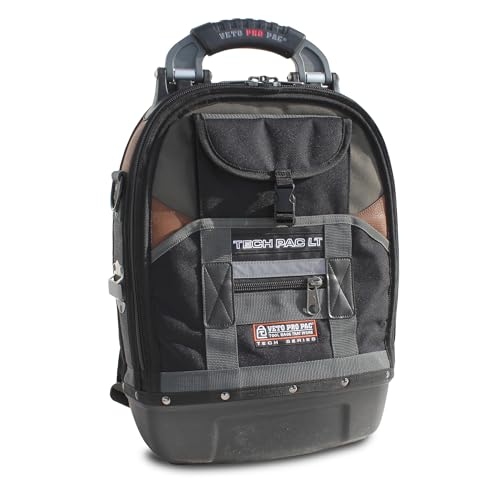
PRODUCT SPECIFICATIONS: Height (H): 19.5" (49.5cm) Width (W): 13" (33cm) Depth (D): 8" (20cm) Weight (empty): 10lbs (4.5kg) Internal Volume: 1550 in3 (25L) Max Payload: 45lbs (20kg) LAPTOP STORAGE: Will accommodate most 15" laptops (15"x10"x1.5" is the max). For 17" laptop storage, see our XLT laptop-tool bag (not a backpack) or our TECH PAC WHEELER or TECH-XL WHEELER (for these Wheeler bags, you must purchase the laptop panel separately).
Step‑by‑Step Guide to Organize Cables & Avoid Damage
Start by gathering all cables and laying them out on a clean surface. Then follow these steps:
- Sort cables by device type and length.
- Inspect each for frays or kinks; discard damaged ones.
- Label each cable with label markers that show its purpose.
- Create a cable inventory list noting length, label, and condition.
- Use zip ties or Velcro straps to bundle cables that belong together.
- Keep bundles loose enough to avoid bending the connectors.
- Store bundles in a drawer or on a tray labeled in the inventory.
- Check the inventory monthly and replace any cable that shows wear.
- Keep the workspace tidy to reduce tripping and overheating risks.
Frankly, the biggest mistake people make is stuffing everything into a tight knot. Worth knowing: a loose bundle lets you pull a plug without stressing the wires. Try this: after you label each cord, snap a small piece of tape on the end so you can spot the right one at a glance.
When you’ve got everything sorted, you’ll notice a calmer workspace and fewer tech hiccups. Does your desk still look like a jungle, or have you finally tamed the chaos?
Give it a go and see how much smoother your day runs. Ready to make the change?
How to Spot Early Signs of Cable Wear Before Failure?

Ever had a charger that works fine one minute and then suddenly stops? Those hiccups are usually a warning sign that the cable’s getting worn out. Spotting the trouble early can keep your gear safe and save you a pricey replacement.
Recommended Products

2" x 20' Ideal for tractors, semis and dump trucks!

MEET THE GENIUSPRO50 — A more powerful evolution of the G26000, delivering next-level performance and charging speed. Built for professionals, it redefines what’s possible in a world-class smart battery charger.

ABOUT SB98510 X2O GEN2 10K WATERPROOF WIRELESS WINCH: The Smittybilt X2O Comp Gen2 Winch is one of the best-performing and most powerful on the market. With a line pull capacity of 10,000 pounds and a 6.6 HP motor, the X20 is more than capable in many off-road applications. The X20's optimized gear ratios result in faster line speeds 218:1, to be exact and it's equipped with sturdy synthetic cable.
Look for frayed insulation
If the outer jacket is cracked or you can see threads, it’s time to swap it out. Exposed wires can short out and cause a fire hazard.
Check the connector
Bent pins, discoloration, or a loose fit all point to wear. A shaky connection can make charging erratic and damage the device’s port.
Test charging speed
If your phone takes longer to fill up or the charge comes and goes, the cable’s internals are probably damaged. Slower fill times are a clear red flag.
Feel for heat
Warm connectors after just a short use mean resistance is building up inside. That extra heat can melt the insulation over time.
Inspect for kinks
Sharp bends stress the copper wires and set the stage for future breaks. Even a small kink can weaken the whole cable.
- Keep a visual checklist on your desk.
- Swap cables that show any of these signs.
- Store spares in a dry, low‑stress area.
Try this: make a habit of giving each cable a quick once‑over before you plug it in. It only takes a few seconds, but it can keep you from a sudden failure.
Fair warning: ignoring these signs can lead to equipment damage or even a fire.
Do you already have a routine for checking your cables? Let’s keep the power flowing safely.
Pick Certified Cables & Organizers for Safer Cable Management

Ever tangled with a cheap charger that sparks or overheats? You’re not alone—most of us grab the first cable we see, hoping it will just work. The truth is, a certified cable and a good organizer can keep your home office or garage a lot safer. Before you click “add to cart,” check for UL, CE, or USB‑IF marks. Those labels mean the product passed industry tests and lowers the fire risk.
1. Choose cables with reinforced connectors****
- Strong connectors boost durability.
- They stand up to frequent plugging without wobbling.
2. Use cable organizers that lock in place
- Velcro straps keep cords neat and tidy.
- Cable clips stop the wire from bending at weak spots.
3. Inspect regularly****
- Swap out any cable whose insulation is cracked.
- Replace connectors that feel loose or shaky.
Frankly, a quick visual check each month can catch problems before they become hazards. Try this: keep a small box of spare certified cables handy so you never have to settle for a cheap replacement.
Following these steps helps you keep charging stations safe and reliable. Got any tips of your own? Let’s hear them.
Recommended Products

Sleek Gold Frame for a Modern Touch – Premium aluminum alloy construction with a stylish gold frame, complementing contemporary bathroom designs. The door features a double-sided mirror, while the cabinet’s back and sides are also mirrored, providing a sleek, fully reflective design for enhanced functionality and aesthetics. Ultra-Clear Tempered Glass for Superior Clarity – Premium tempered mirror enhances durability and provides crystal-clear reflection

[CHARGE & STORE 30 DEVICES] - Designed for 30 chromebooks and versatile enough to support most tablets, laptops/hybrids and ultrabooks.

Upgraded Lighted Medicine Cabinet with Interior Sensor Light - The lighting features ultra-bright, high-density LED strips (192pcs 13W beads per meter, CRI>90), casting a glow that eliminates shadows and dark spots for a flawless reflection. Flicker-free and evenly distributed, the light brings out the truest colors and details of your image. With a simple touch, personalize your lighting from a soft dim to full radiance & set the mood with 3 color temperatures (cool, natural & warm light).
Frequently Asked Questions
How Often Should I Replace Charging Cables in a High‑Usage Environment?
We recommend replacing charging cables every three to six months in high‑usage settings, especially when wear indicators like frayed sheaths, bent connectors, or slow charging appear, so we stay safe and reliable.
Can I Use Cable Clips on Metal Surfaces Without Causing Interference?
We can use cable clips on metal surfaces, and as long as they have magnetic mounting and proper signal shielding, they won’t cause interference, so your charging setup stays safe and reliable.
Do Magnetic Cable Organizers Affect Data Transfer Speeds?
We’ve found magnetic cable organizers don’t noticeably slow data transfer; their magnetic shielding actually helps maintain data integrity by reducing interference, so you can keep cables tidy without sacrificing performance.
Is It Safe to Bundle Power and Data Cables Together in a Conduit?
We say it’s generally safe if you respect EMI concerns and follow solid grounding practices, but we recommend separating high‑current power lines from sensitive data pairs within the conduit to avoid interference.
What Temperature Range Is Acceptable for Stored Spare Cables?
We recommend storing spare cables between 10‑30 °C, keeping storage humidity below 60 %. Over 50 % of market cables fail flame tests, so maintaining these temperature guidelines and humidity control preserves safety and performance.