As an Amazon Associate, we earn from qualifying purchases. Some links on this site are affiliate links at no extra cost to you. Our recommendations are based on thorough research and editorial judgment.


What Makes EV Connector Design Important for Daily Use

We design EV connectors to stay secure, weather‑proof, and fast‑charging every day. 1. The Proximity Pilot and Control Pilot signal a safe lock and prevent over‑current. 2. Ingress protection (IP54) keeps moisture and dust out. 3. Strong locking mechanisms and a clear click stop accidental unplugging. 4. Insertion force 30‑45 N and retention 70‑100 N give a firm, reliable plug. 5. Choose PWM for simple chargers or ISO 15118 for smart home control. 6. Match power (19.2 kW AC vs. 350 kW DC) and connector type (Type 1, Type 2, NACS) to your routine. 7. Follow 23 CFR 680, USCAR2, and SAE J3400 for compliance. Continuing will reveal deeper details.
Key Takeaways
- Reliable mechanical retention (30‑45 N insertion, 70‑100 N retention) and tactile “click” prevent accidental disconnects during daily driving.
- Robust ingress protection (IP54+ with gaskets and drainage) safeguards contacts from dust, moisture, and debris in everyday environments.
- Consistent signal handling (PWM for simplicity, ISO 15118 for smart features) ensures safe charging start/stop and compatibility with vehicle firmware.
- Adequate power rating and thermal management (AC 19.2 kW for home, DC 350 kW for fast stops) match typical daily charging needs without overheating.
- Durable materials and ergonomic design (corrosion‑resistant pins, reinforced housing, textured handle) maintain performance over thousands of insertion cycles.
Why EV Proximity Pilot and Control Pilot Matter for Everyday Safety
You may be interested


Ever plugged in your electric car and wondered why the charger won’t start until the plug clicks into place? That little “click” is more than a sound—it’s the Proximity Pilot (PP) and Control Pilot (CP) working together to keep you safe.
When the PP senses the connector is fully inserted, it locks the vehicle so it can’t roll away. At the same time, the CP sends PWM signals that tell the charger when to begin, pause, or stop. Those signals stop over‑current and protect the cable from damage.
Safety steps
- PP detects connector insertion.
- CP confirms proper lock.
- Charger begins only after both signals are present.
Practical tips
- Verify the lock clicks before charging.
- Watch for the CP light to turn green.
- Do not pull the plug until the CP signals completion.
Frankly, if you skip any of those steps you risk a bad connection or even a safety hazard. Worth knowing: the CP light turning green means the charger has received the go‑ahead signal, so you can feel confident the system is ready.
Try this: before you walk away, give the plug a gentle tug to make sure it’s locked in place. If it wiggles, the PP hasn’t engaged and you should re‑insert it. Once the CP light is green, you can relax and let the car charge.
Following these steps guarantees reliable, everyday safety with minimal risk. Have you ever noticed the CP light flicker before it steadies? That’s the system checking the signals—so keep an eye on it.
How Ingress Protection Keeps EV Connectors Reliable in Rain, Dust, and Snow

Ever tried to charge your EV on a rainy morning and worried about the plug getting soaked? I’ve been there, and a few simple steps can keep your connector working no matter the weather.
Seal the housing – A rubber gasket that hugs the plug tight keeps moisture out. It’s like a tiny door that closes when you plug in, so water can’t sneak in.
Add drainage – Small channels let any stray water escape instead of pooling around the contacts. Think of them as tiny slides that guide the liquid away.
Test for IP rating – Aim for at least IP54. That rating means the connector can handle splashes and dust without short‑circuiting. It’s a good baseline for anyone who drives on wet roads.
Inspect regularly – Take a quick look before each charge. Look for cracked gaskets or blocked channels; a little wear can turn into a big problem fast.
Maintain cleanliness – A quick brush off dust and debris before you plug in does wonders. It’s a habit that takes seconds but saves you from later headaches.
Frankly, a little extra care now saves you from costly repairs later. Worth knowing: keep a small cloth handy in your car for quick wipe‑downs after a drive through a storm.
How Locking Mechanisms Prevent Accidental Unplugs

Ever had your charger pop out while you’re cruising down the highway? It’s a tiny thing, but it can turn a smooth ride into a frantic scramble. The secret is a solid lock that keeps the plug snug, even over bumps and turns. I’ve been using a few tricks that make the connection feel like it’s bolted on, not just clipped together.
First off, give the lock a quick check before you hit the road. You should hear a clear click when the connector seats properly—no click, no good. Make sure the latch is all the way down; a half‑engaged latch is a recipe for a surprise disconnect. If you feel any looseness, give the cable a gentle tug to see if it wiggles. That’s your cue to re‑seat it.
Frankly, the best hardware are the ones with a spring‑loaded latch. They hold the plug tight under load and need a firm push‑release to open. That design adds a bit of tamper resistance, too, so kids or curious bystanders can’t yank the cable loose by accident. Worth knowing: these locks also make it harder for the plug to slip out if you hit a pothole or a sudden brake.
- Use connectors with a spring‑loaded latch for a reliable hold.
- Choose designs that need a deliberate push‑release to open.
- Inspect the lock regularly for wear and replace if it feels slack.
When you’re pulling the cable out, do it slowly and feel for that same click as it releases. Rushing the release can wear down the latch faster, and you’ll end up with a lock that doesn’t bite as hard. Keep an eye on the latch’s condition; a cracked or worn latch is a sign it’s time for a new connector.
Try this: after you’ve parked, give the plug a quick wiggle. If it stays put, you’ve got a solid lock. If it moves, re‑seat it and listen for that satisfying click. A little habit like this can save you from a sudden power loss or a startled moment on the road.
These simple steps keep your charger locked in place and cut down the chance of an accidental unplug. Have you tried any of these tricks on your own setup?
Recommended Products

[4x200W Energy-Efficient Motors & 24V 7Ah Long-Lasting Battery]: Our 24V 7Ah battery offers 42% longer runtime than the standard 24V 4.5Ah batteries, providing uninterrupted playtime without frequent recharges. With a top speed of 5MPH, the powerful motor system and large-capacity battery effortlessly handle small inclines, supporting kids up to 135 lbs. The all-wheel-drive system easily tackles rugged terrains like grass, gravel, sand, and dry mud, ensuring an exciting and smooth ride on various surfaces.

[Multifunctional Design] Integrated hitch balls allow for supreme towing cap. The 2 inch ball is rated for a cap of 15,000 lbs, the 2-5/16-inch ball for 26,000 lbs. Additionally, the connecting hole on the trailer ball fit a 3/4" D-shaped release latch ensures a rated pulling force of 7500 lbs, this integrated hitch ball system can handle even the heaviest loads as heavy trucks or RVs
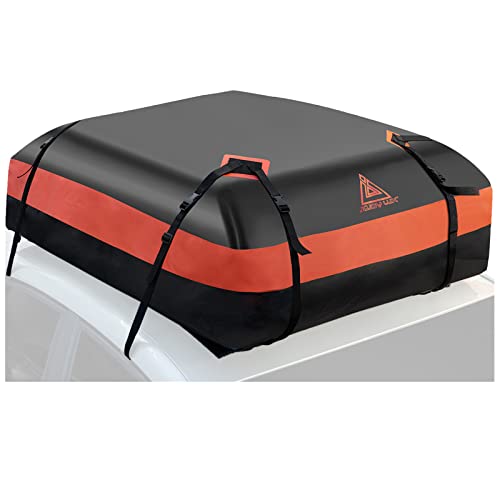
【Check the video first】15 Cubic ft(L46" x W35" x H18").It suits most style of cars, with or without racks; 15 cubic feet capacity can load 2*20-inch suitcase, 2*24-inch suitcase, 6*sleeping bag and 2*4-person tent; perfect for family outing;
Insertion vs. Retention Force: Values That Ensure a Secure Plug‑in

Ever tried plugging in a charger and felt like you were wrestling a stubborn bolt? That tug can turn a quick top‑up into a mini workout. The trick is finding the sweet spot where the plug slides in easily but stays put once it’s seated.
We start by looking at the forces that keep a connector seated. Insertion force is the push you feel when you plug in; retention force is the pull you must overcome to pull it out. Both need balance for daily use.
- Optimal insertion
- Target 30–45 N for most Type 2 and CCS connectors.
- Gives a firm but not tiring push.
- Aim for 70–100 N to prevent accidental drops.
- Higher force protects against vibration.
- Tactile feedback
- A clear “click” signals the connector is fully seated.
- Consistent feedback helps users avoid under‑ or over‑inserting.
- 19.2 kW AC runs on 240 V and 80 A.
- 350 kW DC can push up to 1000 V and 500 A.
- AC charging adds heat slowly, so your pack can manage it without much fuss.
- DC fast charging generates a lot of heat fast, so you’ll need active cooling to keep things safe.
- AC connectors stay small; the pins only have to handle lower current.
- DC connectors are bulkier, built with sturdy contacts that can carry the high current.
- Use AC for overnight home charging when you have plenty of time.
- Use DC for quick stops on long trips, when you need a big boost fast.
- It’s a simple voltage‑based signal that tells the car what level of power to draw.
- You get six basic charging states, from “no charge” to “full charge.”
- There’s no fancy handshake; the car just checks the voltage and goes.
- The hardware is cheap and easy to install, so you’ll save a few bucks.
- This one uses digital communication over the Control Pilot line, so the car and charger actually exchange data.
- A full handshake happens, which means the car knows exactly how much power it can safely take.
- Certificates are managed automatically, giving you a secure link that’s harder for strangers to tamper with.
- Smart features like scheduled charging, load balancing, and even remote start become possible.
- If you want a no‑frills, budget‑friendly charger, PWM does the job just fine.
- If you’re after a secure, automated setup that can grow with new features, ISO 15118 is the way to go.
- Confirm adapter compatibility with Type 1, Type 2, and NACS so you don’t lock yourself out of the market.
- Document every compliance check for audit trails; a tidy file folder makes future reviews painless.
- Test ingress protection and locking mechanisms before you roll out the charger.
- Great for most North American houses.
- The plug feels natural in your hand, so you don’t wrestle with it.
- It tops out at lower power, which is fine for short trips but can leave you wishing for more juice on longer drives.
- You won’t need many adapters, but the ones that exist are a bit scarce.
- You’ll see this one a lot in Europe and newer U.S. builds.
- It supports three‑phase power, so you can charge faster when the grid allows.
- The plug is bigger, yet still comfortable to grab.
- A wider range of adapters means you can handle more road trips without stress.
- Tesla’s own connector is now spreading beyond its brand.
- The design is compact and feels solid in the grip.
- High‑power charging cuts down the time you spend waiting, which is a lifesaver on long hauls.
- Adapter options are growing, though you still have fewer choices than with Type 2.
- Choose metal alloys or reinforced plastics for the housing. They take the strain of daily handling without cracking.
- Pick corrosion‑resistant pins, like copper‑tungsten or brass, so they stay clean and conduct well.
- Add a hard coating to the latch; it stops the little teeth from breaking off over time.
- A textured, rubber‑overmolded handle makes it easier to pull the plug out without slipping.
- Make sure the grip follows a natural hand posture; you’ll notice the difference right away.
- Include a clear visual cue for proper alignment so you don’t waste time fumbling.
- Run a test for at least 10,000 insertion cycles. It sounds like a lot, but it catches weak spots before they become a problem.
- Verify the IP rating for dust and water exposure; you’ll thank yourself when a rainy day hits.
Following these values secures a secure plug‑in without excessive effort.
Frankly, you’ll notice the difference the first time you try a connector that meets these specs. Worth knowing: a solid click isn’t just a sound—it’s a sign the plug is locked in place.
Give it a go and see how much smoother your charging routine becomes. Ready to ditch the struggle?
Recommended Products

UNIVERSAL COMPATIBILITY: Seamlessly transitions between NACS and J1772 connectors, accommodating all major North American EVs including Tesla Vehicles

No Adapter Needed: Charge your Tesla or any vehicle requiring the NACS connection. Emporia's new NACS-specific ev charger works just like the Tesla charger, including remotely opening your Tesla charging port door at the press of a button.

UNIVERSAL COMPATIBILITY Works with all brand EV and PHEVs : but for Toyota Prius & RAV4 please call us first for special non standard J1772 plugs. Up to 4 times FASTER CHARGING speed PRIMECOM Level 2 chargers function at 16 Amps working within an automatic range of 100V-240V works with all brand EVs & PHEVs & Plug-in Hybrids. This 16 Amp model charges at 3.84kw/hour giving upto 15 miles of range per hour! If you need 40/ 50-feet length 32/40Amp chargers
EV Connector Power Delivery Limits: 19.2 kW AC vs. 350 kW DC

Ever wonder why some chargers seem to take forever while others fill your tank in minutes? The answer lies in the power level they deliver. Below is a quick rundown of the two most common setups you’ll see on EV chargers: 19.2 kW AC and 350 kW DC.
Recommended Products

AI-POWERED SMART CHARGING & APP CONTROL – This ev charger level 2 uses Autel’s AI-integrated smart app to schedule charging around time-of-use utility rates, helping lower your monthly bill while boosting station utilization. Start or stop sessions remotely, adjust current from low to high amps, view real-time energy data, and get alerts if anything looks off.

Compatibility: Generac Level 2 48 Amp EV Charger, compatible with all major electric vehicle brands including Ford, Nissan, BMW, Rivian, Hyundai, Volkswagen, Kia, Chevrolet, Audi, Mercedes-Benz, Porsche, and Tesla (Tesla charger adapter sold separately)

THE BRAND YOU TRUST – Leviton has been in homes for over a century and electrifying vehicles for over a decade. Charge at ease with UL/Energy Star Certified stations supported by a 24/7 dedicated team
Power output
Battery thermal impact
Connector sizing
Practical use
Choosing the right level balances charging speed, battery health, and the size of the plug you’ll be handling.
Worth knowing: if you’re mainly driving short distances, the AC option will likely cover most of your needs, while the DC option shines on those rare long‑haul days.
What’s your go‑to charging setup? Let’s hear how you make the choice.
ISO 15118 vs. PWM: Smart Home‑Charging Signals Explained
Ever plugged in your EV at home and wondered why the car seems to “talk” differently depending on the charger? You’re not alone—most folks just want a charger that works without a fuss, but the tech behind it can be a bit confusing. Below is a quick rundown that helps you decide which signal type fits your daily routine.
PWM (Pulse‑Width Modulation)
ISO 15118
Recommendation
Fair warning: the extra capabilities of ISO 15118 might need a newer EV firmware, so double‑check compatibility before you buy. Worth knowing: many newer chargers now support both signals, letting you start simple and upgrade later if needed.
Regulatory Requirements for Public EV Connectors (23 CFR 680, USCAR2, SAE J3400)
Ever tried to set up a public EV charger and felt lost in a sea of rules? You’re not alone—those regulations can feel like a maze, but a few clear steps can keep you on the right track.
23 CFR 680
If your charger gets any federal money, it has to sport a CCS1 connector. Think of this as the go‑to plug for any DC fast station you’re planning. It’s the baseline you’ll need to meet before anything else.
USCAR2
This one caps low‑voltage performance at 20 VDC. Double‑check that your design stays within those voltage and current limits. A quick test with a multimeter can save you a lot of headaches later.
SAE J3400
These standards spell out the mechanical and safety details for North American connectors. Follow the exact dimensions and lock‑mechanism rules, or you risk failing an inspection.
Frankly, the biggest mistake I’ve seen is skipping the early compliance check. It’s far easier to tweak a design on paper than to redo a whole station after it’s built.
Worth knowing: keep a copy of each regulation handy while you’re drafting specs. That way you can cross‑reference on the fly instead of hunting for the right paragraph later.
These steps keep the charger legal, safe, and ready for public use. Got any tips of your own? Share them below!
Type 1 vs. Type 2 vs. NACS: Best Fit for Your Daily Charging Routine
Ever wonder why your EV feels slower to charge at home than on the road? The plug you pick can make a big difference, especially when you’re juggling daily commutes and weekend getaways.
Recommended Products

ORION HIGH PERFORMANCE AMPLIFIER: Serious amounts of power driving ridiculously low impedances at completely sick output levels is what HCCA Series is all about. Whether you're looking for an SPL world record or you just want to do some serious damage on the streets, these amplifiers will ensure they hear you before they see you. Hellacious power intersects with extreme efficiency under rugged die-cast aluminum covers with illuminated ORION badges that tell the world that HCCA is back!

Quantity: Two hundred (200) License Plate Bracket + Mounting Hardware Included / Material: ABS Plastic / Shape of Bracket: FLAT / This is universal bracket that needs to be mounted on flat shape part of the bumper / Will Not Work On Curved Spots Of Bumper / You can mount it on left or right side of the bumper also!
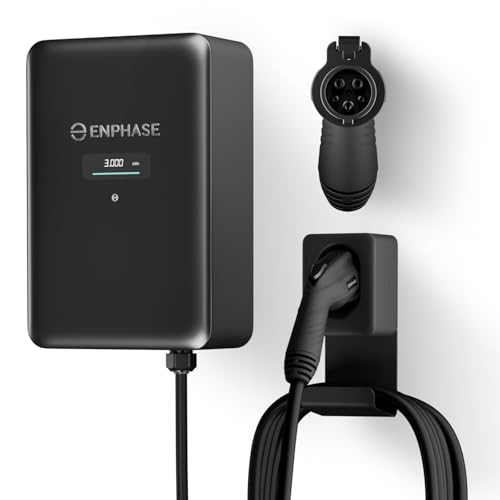
9× FASTER CHARGING: Get faster, smarter EV charging up to 11.5 kW (up to 46 miles/hour). Perfect for overnight charging or quick top-ups.
Type 1
Type 2
NACS
Worth knowing: If you live in a house with a standard 120 V outlet, Type 1 will work right out of the box, but you’ll be limited to slower charging. If you’ve upgraded to a 240 V circuit, Type 2 or NACS can take full advantage of that power.
Try this: Check your garage outlet voltage and see which plug matches it. Then think about how far you usually drive each day. If most of your trips are under 50 miles, a lower‑power connector might be enough. If you often hit the highway, you’ll probably want the higher‑power option.
Choosing the right connector isn’t just about the plug—it’s about matching your home setup and driving habits. Which one feels like it fits your routine best?
Choosing a Durable EV Connector Design That Withstands Everyday Wear
Ever had your EV charger plug feel like it’s on its last legs after a few months of use? You’re not alone—those little connectors take a beating every time you pull them in and out. Below is what I’ve learned from actually swapping out parts and testing them in my garage.
Material selection
Ergonomic grip
Additional tips
Frankly, the little things matter most. Worth knowing: a snug latch and a sturdy housing can keep your connector humming for years.
Got a favorite brand or a hack that’s worked for you? Let me know!
Frequently Asked Questions
Does Connector Temperature Affect Charging Speed on Hot Days?
We’ve found that connector heating can slow charging on hot days, so we apply temperature derating to limit power and protect the plug, ensuring safe, consistent performance despite the heat.
Can I Use a Single‑Phase Charger for a Three‑Phase Vehicle?
We can plug a single‑phase charger into a three‑phase car, but irony’s a joke—compatibility limits bite, plug adapters help, and safety considerations demand proper voltage matching.
What Is the Lifespan of a Locking Ring Under Frequent Use?
We’ve found that a locking ring typically endures 5‑7 years of daily cycles before material degradation and mechanical wear noticeably reduce its retention force, so regular inspections keep performance reliable.
Are There Any Health Risks From Electromagnetic Emissions During Charging?
We assure you that electromagnetic exposure during charging stays well below safety limits thanks to strict shielding standards, and so there’s no significant health risk for everyday users.
How Do I Verify That My Home Charger Meets USCAR2 Compliance?
We’ll tell you it’s as easy as breathing: check the label for USCAR2 certification, verify vehicle communication signals, and confirm ground continuity with a multimeter or certified tester.