As an Amazon Associate, we earn from qualifying purchases. Some links on this site are affiliate links at no extra cost to you. Our recommendations are based on thorough research and editorial judgment.

How Connected Chargers Help Drivers Build Better Charging Habits

We give drivers real‑time maps that show free ports, wait times, and prices, so they can pick the best spot before they leave. Predictive alerts tell them when a charger will be busy, cutting range anxiety. Pricing incentives push charging to cheap off‑peak windows, and usage‑based rewards earn points for evening plug‑ins. Daily checks and health data let fleets spot problems early and keep chargers reliable. Follow these steps and you’ll see how to build steady charging habits.
Key Takeaways
- Real‑time status maps show available ports and wait times, letting drivers plan stops that avoid low‑battery surprises.
- Predictive alerts and personalized forecasts notify drivers of upcoming charger availability, reducing range anxiety and encouraging timely plug‑ins.
- Scheduling tools lock in low‑price windows and time‑based discounts, incentivizing consistent charging during off‑peak periods.
- Automated usage tracking awards points for regular evening plug‑ins, reinforcing habitual behavior without manual logging.
- Connected charger diagnostics and daily checks ensure reliability, so drivers trust the network and maintain a routine charging schedule.
Why Do Predictive Alerts From Connected Chargers Reduce Range Anxiety?
You may be interested


Ever wonder why your EV sometimes feels like it’s on a ticking clock? You’re not alone—range anxiety hits a lot of drivers, especially when you’re heading out on a long trip. The good news is that the alerts from connected chargers can take a lot of that stress away. They let you see which stations are free, which are busy, and which are out of service before you even hit the highway. With real‑time updates and personalized forecasts, you can plan your route with confidence and avoid those dreaded low‑battery moments.
Frankly, the key is to make the alerts part of your pre‑drive routine. Check the app while you’re loading the car, and you’ll see a quick snapshot of charger availability along your planned route. The forecast feature even predicts wait times based on your usual driving habits, so you know exactly where you’ll need to pull over and how long you might be stuck waiting. This simple habit cuts down on surprise stops and keeps your schedule on track.
Here’s the trick: use the alerts to pick routes that have open chargers at each leg of your journey. If the data shows a high demand at a particular station, you can either shift your departure time a bit later or choose a nearby alternative. The system’s personalized forecasts match your driving style, so the recommendations feel natural instead of generic.
Try this:
- Check alerts before departure.
- Use forecasts to choose routes with open chargers.
- Adjust departure time if alerts show high demand.
These steps keep you in control and stop the panic that comes with a low battery. You’ll find that the real‑time alerts reduce the need for unexpected detours, and the tailored forecasts help you stay on schedule without constantly second‑guessing your next move.
In the end, staying calm on the road is all about being prepared. By letting the charger alerts do the heavy lifting, you can focus on the drive instead of the drain. Ready to give it a go on your next trip?
Connected Charger Pricing Incentives Shift Charging to Off‑Peak Hours
Ever notice how your electric bill spikes the moment you plug in your car after work? I’ve been there, and the good news is you can dodge those pricey peak hours with a few simple moves.
First, open the charger’s app and look for the cheapest two‑hour window. The app shows time‑based discounts and dynamic tariffs, so you’ll see exactly when rates dip. Plug in during that window and you’ll lock in the lower price. Set a reminder to pull the plug before the peak rates kick back in.
- Time‑based discounts can shave up to 30 % off your charging cost.
- Dynamic tariffs shift automatically with grid load, keeping you in the low‑price zone.
Try this: use the charger’s schedule feature to stay in the low‑price zone. It’s a small habit that saves you money and eases strain on the grid, helping utilities balance demand without extra hardware.
You’ll find that following these steps not only cuts costs but also makes your charging routine feel a lot smoother. Ready to give your wallet a break?
Recommended Products

Universal Compatibility: The IQ 60 EV Charger features a ruggedized NACS connector and is ideal for Tesla electric vehicles and other NACS-compatible electric vehicles with acceptance rates up to 11.5kW. Plus, you may qualify for federal and local tax credits and rebates for home electric car charging.
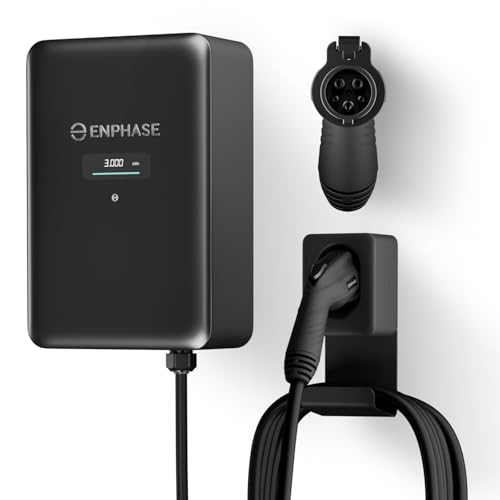
9× FASTER CHARGING: Get faster, smarter EV charging up to 11.5 kW (up to 46 miles/hour). Perfect for overnight charging or quick top-ups.

INSTALL WITH CONFIDENCE: The Enphase HCS-50 EV Charger, formerly known as ClipperCreek, delivers award-winning durability and reliability. Installation is quick and straightforward—connect it to a dedicated 50 Amp circuit by any licensed electrician.
How Usage‑Based Rewards Promote Consistent Evening Plug‑In
Ever find yourself driving home, thinking about charging, and then forgetting to plug in until it’s too late? That missed reward can be frustrating, especially when you’ve got a simple fix that fits right into your evening routine.
Plug in between 6 pm and 8 pm, and you’ll start seeing points stack up without any extra hassle. The app logs each evening session automatically, so you don’t have to keep a manual record. As the points add up, you can swap them for discounts or free charging minutes—nothing fancy, just a straight swap.
Frankly, the trick is to treat the plug‑in like any other daily habit. You already have a routine after work: grab your bag, head to the kitchen, maybe check the mail. Adding a quick plug‑in at the same spot in the day makes it almost invisible. Consistency builds higher earnings, and predictable rewards keep the habit alive.
- Consistency builds higher earnings.
- Predictable rewards reinforce the habit.
- Simple tracking avoids confusion.
Follow these steps, and you’ll see steady progress without extra effort. This method aligns charging with your regular commute and maximizes evening incentives.
Ready to give it a try? Let’s see how quickly those points add up.
Recommended Products

MODERN AND ESSENTIAL DESIGN: Poldina Pro, designed according to eco-design principles, adapts to any style of decor. A gold leaf has been applied to enhance this model type

4 LARGER STORAGE DRAWERS: Maximize your bedroom storage with 4 drawers with wheels, perfect for storing quilts, clothes, toys, or whatever. Even small apartments can always be kept spacious and tidy to free up more room for movement

【PREMIUM VELVET HEADBOARD – COMFORT MEETS STYLE】 Premium velvet upholstered king bed frame brings a clean, refined look to your bedroom. The king upholstered bed frame adds warmth without overpowering the space. Soft padding offers comfortable back support for reading or scrolling
Visualize Charger Availability & Plan Efficient Routes With Connected Charger Apps
Ever gotten stuck at a charging station because the app said it was free, but the spot was already taken? It’s frustrating, especially when you’re trying to keep your road trip on schedule. I’ve found a few tricks that make the whole process smoother, and I want to share them with you.
Real‑time charger status
Open the app and turn on Real time availability. The map instantly shows which ports are open, which are occupied, and even the expected wait times. When you tap a charger, you’ll see the price, power level, and how far it is from you. This quick glance helps you pick the best spot before you even leave the house.
Route optimization
Enter your destination and current battery level, and the app will suggest stops that keep detours short. It ranks chargers by how free they are and how fast they can charge. Follow the suggested route, keep an eye on the live status, and be ready to switch if a charger gets busy. This way you stay on track and avoid surprise delays.
Try this:
- Open the app and enable Real time availability.
- The map shows open ports, occupied ports, and expected wait times.
- Tap a charger to view price, power level, and distance.
For route optimization:
- Enter destination and current battery level.
- The app suggests stops that minimize detour distance.
- It ranks chargers by availability and speed.
Recommended Products

[Important Notice] Due to local regulations, this product is NOT CARB-approved. Cannot be shipped to California.

Drive Faster, Further, and Longer in Minutes: Lithium Rhino 48V 105Ah lithium battery for golf cart with conversion kit allows you to transform your cart with boosted performance, drive range, and zero maintenance for all-day worry-free riding on a single charge. Made with the highest grade A EVE cells for up to 50 miles range per charge and 6000+ Charge Cycle life.
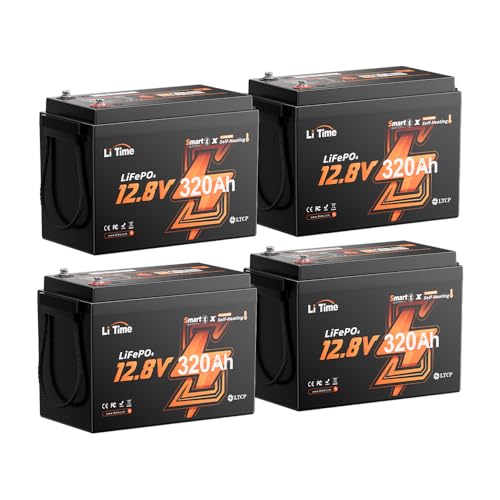
2 Upgraded Heating Modes: 12V 320Ah Mini Self-Heating Battery comes with Regular and Energy-Efficient options. Regular mode activates heating below 41℉(5℃) when charged, stops at 50℉(10℃) to begin charging—suits cold-weather needs.
Integrate V2G Signals for Smarter Home Charging
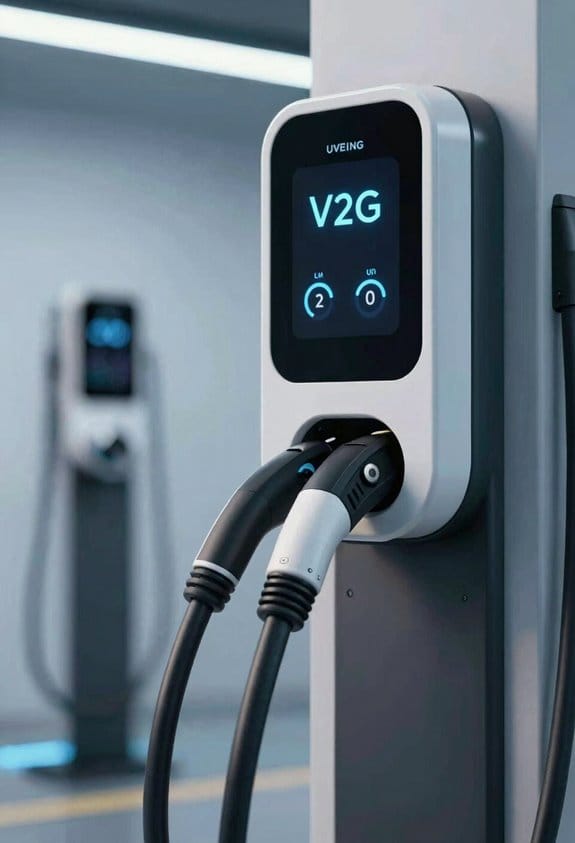
Ever wonder why your electric car seems to sit idle while the grid’s humming away? You can actually turn that idle time into a two‑way power flow, making your home charger smarter and helping the neighborhood stay balanced.
Integrate V2G signals into your home charging setup to turn your EV into a two‑way power source. We can use V2G scheduling to decide when to charge and when to feed power back to the grid. This makes home charging smarter and helps the grid stay balanced.
1. Set up a Grid aware charging plan.
- Choose off‑peak hours for charging.
- Allow the system to discharge during peak demand.
2. Connect your charger to a V2G‑compatible app.
- Enable automatic adjustments.
- Monitor energy flow in real time.
3. Review daily reports.
- Check savings.
- Verify grid contribution.
Frankly, the biggest win is watching your bill shrink while you give a little back. Worth knowing: a good V2G app will show you exactly when your car is charging and when it’s sending power out, so you never have to guess.
Try this: set your charger to start at 2 a.m., then let the app decide when to reverse‑feed during the 5 p.m. rush. You’ll see the numbers line up and feel good about the impact.
Got any tips of your own? Share them below and let’s keep the conversation rolling.
Fleet Managers Use Connected Charger Metrics to Standardize Driver Routines
Ever find yourself juggling when trucks need to charge and when drivers are on the road? It’s a hassle that can mess up your schedule and burn through cash fast.
Typically, fleet managers rely on connected charger data to shape driver habits and lower costs. We pull real‑time usage stats and feed them into fleet telematics dashboards. This lets us see when each vehicle plugs in, how long it stays, and how much energy it draws. From there we can set clear driver routines.
- Define a daily charge window (e.g., 8 am‑10 am).
- Assign each driver a preferred charger based on location.
- Use alerts to remind drivers to start charging within the window.
Benefits:
- Consistent battery health.
- Predictable energy spend.
- Faster route planning.
Frankly, the trick is to make the data work for you, not the other way around. Try this: set a simple schedule and stick to it for a week. You’ll see the patterns pop up and you can tweak them before anything goes wrong.
If you keep the charge window tight, you’ll notice fewer surprise low‑battery alerts and smoother daily ops. It also helps you plan routes with confidence, knowing each truck will have the power it needs.
How to Spot Charger Problems Early and Keep Them Running
Ever had a charger act up just when you need it most? It’s frustrating, but a quick daily check can stop a small hiccup from turning into a big outage.
When you give your charger a once look each day, you’ll spot problems before they cause downtime. Start with a quick visual check.
- Look for connector corrosion on plugs and cables. Clean any green or white residue with a dry cloth.
- Verify indicator lights. A blinking amber often means a firmware rollback is pending. Install the latest firmware from the portal.
Frankly, testing the charge rate is a simple way to catch hidden issues. If it drops more than 10 % from the norm, log the event and investigate.
Worth knowing: the network status icon tells you a lot about communication health. A gray symbol signals loss of communication; just reboot the unit and see if the icon returns to normal.
Try this: make a habit of recording the error code in your maintenance log. Having a history of codes helps you spot patterns and call support with the right details.
You’ll find that these tiny habits keep your chargers humming smoothly, and you’ll avoid the panic of a sudden shutdown.
Do you already have a routine for checking your gear, or is this a new addition to your checklist?
Recommended Products

Bundle Items Include:Nikon Z8 Professional Full Frame Mirrorless 8K Video & Stills Hybrid FX Camera, Nikon NIKKOR Z 28-400mm f/4-8 VR Mirrorless Lens, 64GB Memory Card, EN-EL15c Replacement Battery, External Battery Charger, Soft Bag, Photo Editing Software, Memory Card Reader, 3 Piece Filter Kit, 12" Flexible Tripod, Cleaning Kit, Memory Card Wallet, Hand Strap, Lens Cap Keeper

CANON USA AUTHORIZED - INCLUDES FULL USA WARRANTY | EOS R7 Mirrorless Camera - With a 15 FPS mechanical shutter, the high-performance EOS R7 is the most advanced APS-C camera from Canon. Featuring a high-speed shooting 32.5 MP sensor, in-body stabilization up to 7 stops with coordinated control IS, and 4K60p video, it offers maximum versatility for dedicated professionals and advanced hobbyists alike whether capturing photo and video of fast action, wildlife, and everything in between.
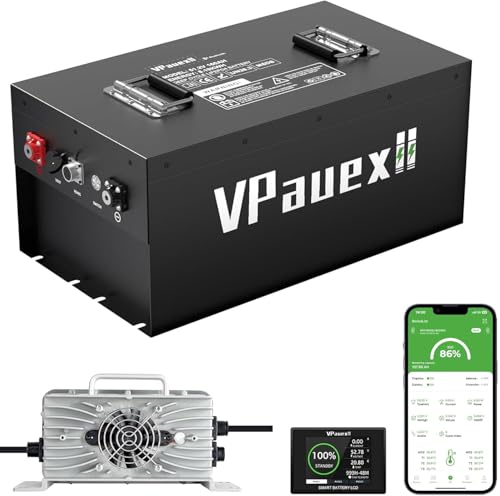
✔️[12 Years Lifetime and 6000+ Deep Cycles]: VPauexii 48 volt lithium golf cart battery conversion kit is made of new grade A+ cells. 12 years lifetime and 6000+ deep cycles is not just a slogan under instructions on the product manual,is the result of our relentless pursuit of product quality.Full 5-Year Battery Warranty – No Hidden Costs.
Connected Charger Health Data Drives Proactive Maintenance for Reliable Access
Ever been stuck waiting for a charger that just won’t work? It’s frustrating, especially when you’re on a tight schedule. The good news is that the chargers you rely on can actually tell you when they’re about to act up—if you know what to look for.
I’ve been tracking my own chargers for a while now, and I’ve learned a few tricks that keep them humming. First off, keep an eye on the basics: voltage, current, temperature, and any error codes that pop up. When something drifts outside the normal range, it’s a sign that a problem could be brewing. I set up alerts that ping me the moment a metric spikes, so I’m never caught off guard.
Here’s the trick: use the data you collect to forecast uptime. By feeding the recent readings into a simple model, you can predict how likely each charger is to stay online over the next week. That way, you can plan maintenance before a driver even notices a hiccup.
Monitor key metrics – voltage, current, temperature, and error codes.
Set alerts – trigger a notification when a metric exceeds normal limits.
Apply uptime forecasting**** – model each charger’s likely availability for the next week.
Honestly, the best part is that you don’t need fancy equipment—just a reliable data feed and a bit of patience. Start with a daily check‑in, and soon you’ll see patterns that help you stay ahead of issues. Your chargers will thank you, and you’ll spend less time dealing with unexpected downtime.
Give it a try and see how much smoother your charging routine becomes. Ready to keep your chargers running like a well‑tuned engine?
Recommended Products

【Top-Flight Performance 】The 51.2V 100Ah liFePO4 battery is manufactured by 16Pcs Automotive Grade A grade prismatic cells with higher energy density, more stable performance & greater power. And has a compact 5.12kWh energy, which is equivalent to 4pcs 12V 100Ah LiFePO4 batteries in 4S (or even 8pcs 12V 100Ah AGM batteries in 8S). Fully compliant with the UL1973 safety standard and certified by Intertek ETL for reliable safe operation.

Ditch the Bulky Battery: Fed up with bulky batteries wasting your space? 12V 320Ah compact battery cuts size by 1/3 smaller than 12V 300Ah, 70% lighter (57.3lbs) than 3 lead-acid 12V 100Ah, boasting 4096Wh energy (256Wh more power) to fit into tight spots and deliver extra power.

Ultra-Compact, Power-Dense: 1280Wh energy in a 9.02"x5.43"x8.19" Group 22NF case. 194.7Wh/L density delivers massive power in minimal space.
Frequently Asked Questions
How Do Connected Chargers Protect User Data Privacy?
We protect your privacy by encrypting all data in transit and at rest, while sending only anonymized telemetry. This way you stay secure, and we can improve services without exposing personal details.
Can I Sync My Charger Schedule With Personal Calendar Apps?
We can sync your charger schedule with personal calendar apps—ironically, it’s easier than remembering to water plants. Calendar integration works seamlessly, and cross‑platform syncing keeps every device on the same charging timeline.
Do Connected Chargers Support Multiple Vehicle Authentication Methods?
We support multiple authentication methods—RFID tokens and Bluetooth pairing work seamlessly, so you can tap a card or connect via your phone without hassle, ensuring every vehicle accesses the charger securely.
What Impact Do Firmware Updates Have on Charger Performance?
We’ve seen firmware optimization instantly boost charging speed, while neglecting updates can cause performance degradation; that’s why we always push the latest patches, ensuring your charger stays reliable and efficient.
Are There Limits on the Number of Vehicles per Charger in a Household?
We’ve found that a single home charger can safely serve two or three cars, but respecting charging etiquette and space optimization keeps cables tidy, prevents overload, and guarantees everyone gets reliable power when they need it.