As an Amazon Associate, we earn from qualifying purchases. Some links on this site are affiliate links at no extra cost to you. Our recommendations are based on thorough research and editorial judgment.

Why Charging Cable Clutter Is a Bigger Problem Than It Looks

We lose minutes each day untangling cords, and those small delays add up to lower productivity and higher stress. Tangled chargers interrupt work flow, cause screen‑switching fatigue, and increase anxiety about finding the right plug at night. They also clutter visual space, making rooms feel cramped and unsafe. A single charging station, color‑coded cables, and a central power hub can cut clutter by up to 80 %. USB‑C standardization reduces e‑waste and simplifies charging. If you keep reading, you’ll discover practical steps to tame cable chaos.
Key Takeaways
- Tangled cords cause repeated pauses, eroding productivity and increasing stress.
- Visible cable clutter disrupts visual harmony, making spaces feel cramped and reducing perceived openness.
- Disorganized chargers heighten safety risks, including tripping hazards and accidental unplugging.
- Inefficient cable management leads to wasted time searching for the right charger, amplifying daily friction.
- Excessive, outdated cables contribute to e‑waste, while standardized USB‑C solutions simplify setup and future‑proof devices.
How Cable Clutter Reduces Home Productivity
You may be interested


Ever feel like your tangled cords are stealing your focus? When a charger snakes across your desk, you end up pausing just to untangle it before you can get back to work. Those little delays pile up, eating minutes every hour and dragging down your overall output.
Frankly, a few simple habits can keep your space clear and your mind on the task at hand. First, set up a single charging station in each room. That way, you don’t have chargers hunting for a free outlet. Next, grab some cord clips and route the cables away from your work surface. It’s a tiny step that makes a big difference.
Worth knowing: store any spare chargers in a drawer and label each cord by the device it belongs to. When everything has its spot, you won’t waste time guessing which plug goes where. This also helps you keep your focus zones intact, so you can dive straight into a project without interruptions.
Here’s the trick: keep your desk clear of any cords that cross the main work area. If you need a phone charger, plug it into the charging station instead of leaving it on the table. A tidy space lets you start tasks quickly and stay in the flow longer.
By cutting down on cable mess, you’ll notice steadier progress and fewer distractions. Your home office will feel more efficient, and you’ll get more done without the constant stop‑and‑go.
Do you think a little organization could boost your daily productivity? Give it a try and see how much smoother your workday runs.
Why Tangled Chargers Stress Out Parents and Professionals
Ever found yourself untangling a knot of chargers just to get your phone alive, while the kids are already half‑asleep? That nightly scramble can turn a simple routine into a stress test for both parents and anyone who works from home. The mess makes you hunt for the right cord, steals a few minutes, and adds a pinch of anxiety. It also pushes you to switch devices faster than you’d like, leading to screen fatigue, and it can ruin bedtime when kids are fighting over the last charger.
How to reduce stress:
- Create a charging station – pick a shelf or drawer and keep all cords there.
- Use color‑coded cords – assign a color for each device so you can spot the right one at a glance.
- Adopt a multi‑port hub – one outlet can power several gadgets at once.
- Implement wireless pads – a few charging pads on nightstands can replace most cables.
These steps cut clutter, lower screen fatigue, and keep bedtime routines smooth. Frankly, a tidy setup makes the whole house feel calmer. Worth knowing: you’ll save a few minutes each night, and those minutes add up to a nicer evening for everyone.
Give one of these ideas a try and see how much easier your evenings become. Ready to ditch the charger chaos?
How Cable Clutter Hurts Your Home’s Aesthetic Appeal
Ever notice how tangled cords ruin a clean room look? The visual harmony drops when cables spill onto shelves or floors, pulling the eye away from your décor and making the space feel cramped.
Group chargers – Use a single power strip for nearby devices.
Cord camouflage – Run cables behind furniture or inside decorative sleeves.
Label cords – Attach simple tags to identify each plug quickly.
Designate zones – Keep all charging spots in one area, like a nightstand.
Try this: gather all the chargers you use daily, plug them into one strip, and hide the strip behind a bookcase or the back of a desk. Then, run the cords through a fabric sleeve that matches your wall color. A quick label with a piece of tape and a marker will save you minutes when you need to unplug something.
Frankly, a tidy cable setup not only looks better but also reduces the chance of tripping or accidental unplugging. When you keep the cords out of sight, the room feels more open, and you’ll notice how much easier it is to focus on the things that matter.
What’s the first spot you’ll tackle?
How Wireless Charging Cuts Cable Clutter by Up to 80

Ever find your nightstand looking like a tangled mess of cords? Switching to a wireless charging pad can clear up to 80 percent of that clutter. A single magnetic pad can hold your phone, earbuds, and smartwatch all at once, so you’re not juggling a bunch of cables.
How to set it up
- Pick a wireless docking station with a strong magnetic pad.
- Put the dock on a stable surface near a power outlet.
- Align each device’s charging coil with the pad.
- The pad snaps devices into place, so no cords tangle.
- The dock can power three or more gadgets simultaneously.
Try this: make sure the pad’s power rating matches your devices. That simple switch clears space and keeps the area tidy.
Frankly, once you’ve got everything charging in one spot, you’ll wonder why you ever put up with a knot of cords.
What’s the best part? You get a clean desk or nightstand without buying a whole new set of accessories.
Ready to declutter? Give it a go and see how much smoother your routine feels.
Recommended Products

1.【Long Working Range】Tour guide system has equipped with our proprietary "RangeBoost" technology,IndoorLink E211 wireless handheld transmitter ensures robust signal strength and exceptional interference resistance. It delivers stable transmission over a distance of up to 180 meters (600 feet), which is three times the range of traditional 2.4GHz voice transmission systems

AMD Ryzen 7 8840U (8-Core, up to 5.1 GHz) with AMD Radeon 780M Graphics; Upgraded LPDDR5X 7500 MT/s Memory for Faster System Responsiveness

【Innovative 3D Pool Cleaning System】Beatbot Aquasense 2 and iSkim Ultra combine to create an intelligent cleaning ecosystem that provides comprehensive vertical coverage from the water surface to the pool floor. Aquasense 2 handles precision underwater cleaning while iSkim Ultra manages surface skimming, working together to address cleaning challenges throughout the entire pool area.
What to Look for in a Central Power Hub to Tame Cable Clutter
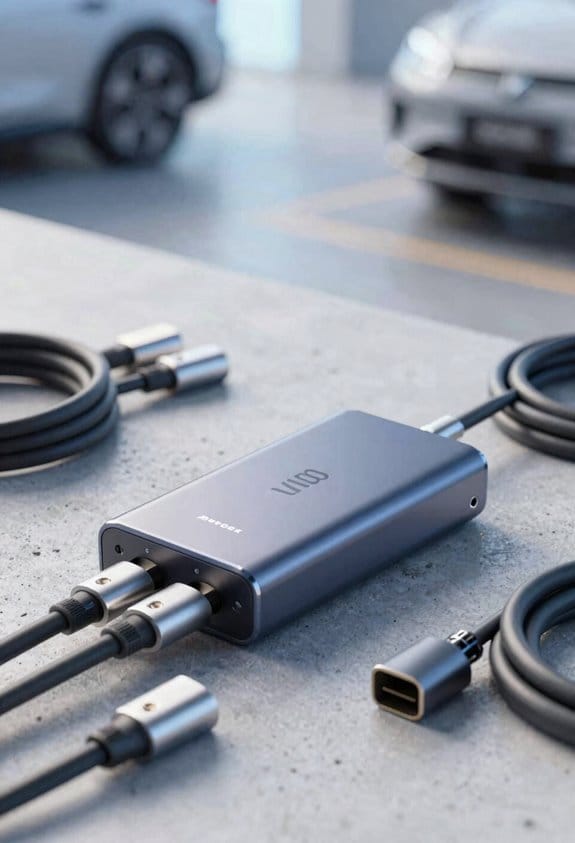
Ever stared at a tangle of cords and wondered how you could finally get a clean, safe charging spot? I’ve been there, and after a few trial‑and‑error rounds, I’ve nailed down what makes a good central power hub.
Recommended Products
6-PIECE POWER RECLINING SECTIONAL: This sectional makes everyday lounging effortless. A modular design gives you the flexibility to rearrange as you please. Clean up spills with ease thanks to a faux leather that’s as beautiful as it is functional

Energize Almost Everything. The EcoFlow DELTA Pro 3 supports 120V/240V voltage and has a 4000W output (6000W with X-Boost, scalable up to 12000W), powering nearly all essential home appliances, such as a 3-ton* central AC or a 1 HP water pump.

[Whole-Home Backup System Hub] Smart Home Panel 2 is the hub of the powerful DELTA Pro Ultra that allows you to get the full potential out of your energy system. Connect your home circuits with EcoFlow DELTA Pro Ultra and utilize up to 3 plug-and-play inverters and 15 stackable 6kWh batteries. Alternatively connect 3 x EcoFlow DELTA Pro 3 units with 6 x Extra Batteries for energy storage up to 36kWh. It's not just for longer backup but lets you to control and run every single household appliance.
What to Look for in a Central Power Hub to Tame Cable Clutter
If you want to tame cable clutter, choose a central power hub that balances capacity, safety, and flexibility. We recommend checking three key features:
- Smart outlet – Look for built‑in surge protection and automatic shut‑off. It should support both 110 V and 220 V to cover all devices.
- Modular docks – Pick a hub with interchangeable dock modules. You can add USB‑C, USB‑A, or wireless pads as needed.
- Cable management – Make sure the hub includes built‑in clips or a channel to guide cords neatly.
- Verify the total wattage exceeds your devices’ combined draw.
- Choose a model with a sturdy, non‑slip base.
- Confirm it meets UL or CE safety standards.
These steps give us a tidy, safe charging station that fits any room.
Frankly, the biggest mistake people make is buying a cheap hub that can’t handle the load. When you plug in too many gadgets, the whole thing overheats, and that’s a fire hazard you don’t want.
Worth knowing: a hub with modular docks lets you swap out ports as your tech changes, so you won’t need a new unit every year.
Try this: line up the hub on a flat surface, plug in a few devices, and watch how the cords stay in place. If anything feels loose, adjust the clips or add a short zip‑tie.
Do you ever feel like your desk is a battlefield of wires? A good hub can turn that chaos into a neat, organized space.
Simple Ways to Separate, Store, and Retrieve Cords Quickly
Ever tangled with a drawer full of cords and still can’t find the right one? You’re not alone. I’ve been there, and after a few tweaks the chaos turned into a tidy system that actually works.
After setting up a central power hub, the next step is to keep the cords you already own easy to find and use.
1. Sort cords by device type.
- Use color‑coded pouches for phones, tablets, laptops, and accessories.
- Label each pouch with a simple tag.
2. Bundle excess length.
- Wrap cords with Velcro wraps.
- Secure the wrap near the connector.
3. Store bundles in a drawer or bin.
- Place each pouch in a dedicated slot.
- Keep the bin upright for quick access.
4. Retrieve when needed.
- Pull the appropriate pouch.
- Unwrap the Velcro and plug in.
These steps keep cords visible, organized, and ready for use without hunting. Try this: put a small label on the inside of each pouch so you can spot the right one without pulling everything out. Honestly, once you’ve set it up, you’ll spend minutes a day looking for a charger instead of an hour.
Got a favorite way to keep your tech tidy? Share it below!
Recommended Products

Effortless Power for RVS & EVS: Power up your RV or electric vehicle with Power Grip's 50 amp RV cord. This 50' long camper essential offers ample length to keep your RV or EV reliably powered.

Size: 4" | Length: 100 Feet | Color: Black
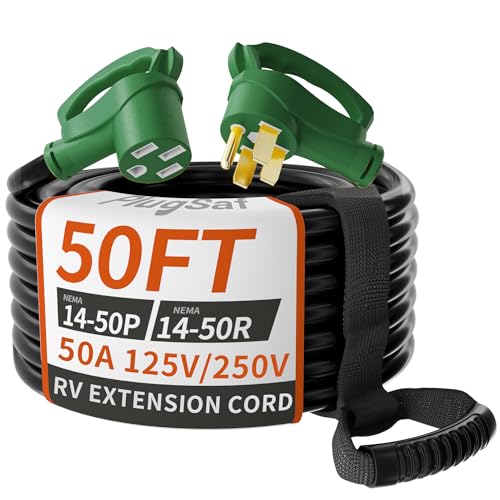
50AMP RV Extension Cord: 4 Prong RV cord 50 foot, STW, 125V/250V, 50Amax, meeting the power requirements of most RVs/EVs and camping equipment; Male plug NEMA 14-50P, female socket NEMA 14-50R, ETL/cETL listed heavy duty RV extension cord 50 ft
How USB‑C Standardization Lowers E‑Waste and Simplifies Charging
Ever you have a drawer full of tangled chargers and wonder why you keep buying new ones?
USB‑C is becoming the go‑to charger for many devices, and it’s helping us cut down on e‑waste while making charging easier. We can see three clear benefits.
Device longevity – Using one robust cable reduces wear on multiple chargers, so each device stays functional longer.
Port consolidation – A single USB‑C port replaces several older ports, so we need fewer adapters and cables.
Reduced waste – Fewer discarded chargers mean less plastic and metal in landfills.
What to do:
- Replace old chargers with USB‑C models.
- Keep one spare USB‑C cable in each room.
- Use a single power strip with USB‑C ports for multiple devices.
Frankly, you’ll notice fewer frayed cords and a cleaner desk. Worth knowing: a single cable can charge a phone, tablet, and laptop all at once.
Try this: pick a spot in each room for a spare USB‑C cable and stick to it. You’ll be surprised how often you reach for that one cable instead of rummaging through a pile.
Recommended Products

Device Ports: (1) Host Port - Thunderbolt 3 (USB-C) up to 40 Gb/s (5000 MB/s), (1) Thunderbolt 3 (USB-C) Port, (2) USB 3.2 Gen 2 Type-A Ports up to 10Gb/s (1250MB/s) - USB 2.0/3.0 backwards compatible, (1) HDMI Port, (1) 2.5 Gigabit Ethernet (2.5GbE) RJ-45 Port, (1) SD 4.0/UHS-II Media Slot; Host Port Requirements: Thunderbolt (USB-C) port (backward compatible with Thunderbolt 2/Thunderbolt)

100MP Hasselblad Camera: 4/3 CMOS sensor with Hasselblad Natural Color Solution delivers 6K/60fps HDR video and ultra-detailed 100MP photos for professional-grade imaging

Unlimited Range Rapid Global Walkie Talkie (Lifetime Free SIM) FCC ID:2AN96PO25601 Break distance barriers with 4G LTE SIM support, enabling long-distance communication with 5000 miles+ coverage via cellular networks. Enjoy nationwide connectivity without subscriptions or hidden fees.
Future‑Proof Your Home Office With Minimalist Charging Solutions for 2026+
Ever feel like your desk is a tangle of cords and chargers that never quite keep up with new gadgets? You’re not alone. I’ve tried a few tricks that actually make the space feel cleaner and ready for whatever tech comes next.
1. Pick a modular dock that handles USB‑C, Lightning, and Power Delivery.
It’s a single piece you can swap ports on, so you don’t have to hunt for a new adapter every time a device updates. The dock stays on your desk, and you just slide the right connector in.
2. Go for a cable‑free desk surface with built‑in wireless charging pads.
Drop your phone or earbuds on the pad and the cords disappear. It looks neat and you avoid the constant “where’s the charger?” scramble.
3. Consolidate power with a smart strip that monitors load and supports fast charge.
One strip replaces a bunch of chargers, and the smart features let you see how much power each device is pulling. It’s a small step that cuts down on clutter and saves energy.
4. Keep a spare USB‑C cable in a drawer for those moments when a wire is still the best option.
You’ll thank yourself when a meeting calls for a quick wired connection. It’s cheap, easy to store, and it saves you from scrambling for a cable at the last minute.
5. Label each port on the dock to avoid mix‑ups.
A quick sticker or a tiny tag tells you which port is for charging, which is for data, and which is for video. No more guessing games when you plug something in.
These steps cut clutter, reduce waste, and keep your workspace ready for new devices after 2026.
Try this: set up your desk with the modular dock and wireless pads, then add the smart strip and labeled ports. You’ll notice the difference the moment you sit down.
Fair warning: you might start forgetting where you put your old chargers because you’ll have so few of them left.
What’s the one change you’ll make to tidy up your office today?
Recommended Products
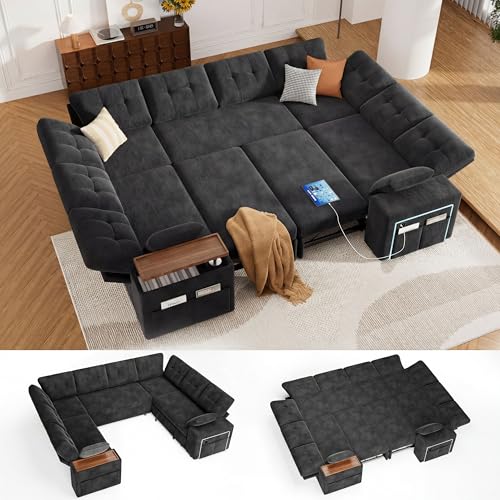
Convenient Multi-Box Delivery: Your sofa arrives in separate, manageable packages. The longest dimension of each box is carefully controlled under 50 inches, ensuring it fits easily through narrow doorways and entryways without hassle.

14-in-1 Thunderbolt 5 Dock: Equipped with a Thunderbolt 5 upstream port, two Thunderbolt 5 downstream ports, two USB-C ports, three USB-A ports, SD and TF card readers, an AC input, a 2.5Gbps Ethernet port, an audio jack, and an HDMI 2.1 or DisplayPort 2.1 port. It also includes an advanced active cooling system for optimal performance even under full load, preventing overheating.

10-in-1 Essential Connectivity: Equipped with 3× 10Gbps USB-A, SD/TF 3.0 dual card reader, Gigabit Ethernet, DP2.1, and 2× TBT5 downstream—covers all daily peripheral, networking, and display needs
Frequently Asked Questions
Do High‑Capacity Power Strips Increase Electricity Bills?
We’ll tell you that high‑capacity power strips don’t inherently raise bills; their power draw depends on what you plug in. Good strip efficiency means idle devices waste less electricity, keeping costs stable.
Can Cable Organizers Damage Cords Over Time?
We can say that Velcro wraps may cause heat buildup if tightly packed, potentially damaging cords over time; so we recommend using breathable ties and allowing airflow to protect your cables.
Are Wireless Chargers Safe for Children?
We assure you wireless chargers are generally safe for children; they emit low electromagnetic exposure, and as long as you follow manufacturer guidelines and keep devices out of reach, child safety remains well protected.
How Many Watts Should a Central Hub Supply for a Home Office?
We recommend a 100‑watt power budget for a typical home‑office hub, meeting USB‑PD delivery standards and ensuring enough headroom for laptops, monitors, and accessories without overloading the circuit.
Does Usb‑C Support Fast Charging for All Devices?
We say yes—USB‑C standards support fast charging, yet not every device uses the same charging protocols. So while the connector’s universal, the speed varies, making careful matching essential.